New sign-ups are on hold for now. So many people have joined Tax App's free plan that we have paused new sign-ups while we make room. Existing accounts work as normal. Contact us for more information.
Guide
Short stays
Short stays is coming soon. You can see it in Settings, then Organisation, under Modules, marked Coming soon.
If you rent out a room, a sleepout or a whole house for a few nights at a time, Tax App keeps a record of every booking: who it came through, the nights, and what you earned. Your accountant gets income figures they can use as they are.
Where bookings come from
Each stay names the platform it was booked through. Tax App keeps the list of platforms you can choose from. It starts with Airbnb, and Manual Booking for a guest who booked with you directly. More platforms are added to the list as Tax App supports them.
Why your payout is not your income
Airbnb does not pay you what the guest paid. It keeps its fee, and if you are not registered for GST it adds a flat-rate GST credit of 8.5% of the price. So the amount in your bank is neither what you charged nor your income. Here is one stay worked through:
- The guest pays $200 for the stay, before GST.
- Airbnb keeps a $30 fee.
- Airbnb adds a $17 flat-rate credit (8.5% of $200).
- $187 reaches your bank.
You enter the $187 and the $30 fee from Airbnb's statement. Tax App fills in the $17 credit, and you check it against the statement. It then records $200 as your income from the stay. The $30 fee is shown beside it, and the $17 credit is not taxed as income.
For a Manual Booking there is no platform in the middle. You enter what the guest paid you, and that is the income.
Adding stays
You can add a stay by hand, or import a batch of them. Choose Airbnb and add the earnings file you download from Airbnb, or choose Manual Booking and fill in its template with the stays booked with you. The import shows every stay it found before anything is saved, and you tick the ones to bring in. Stays already recorded are shown but cannot be ticked, so a file you imported before can be imported again.
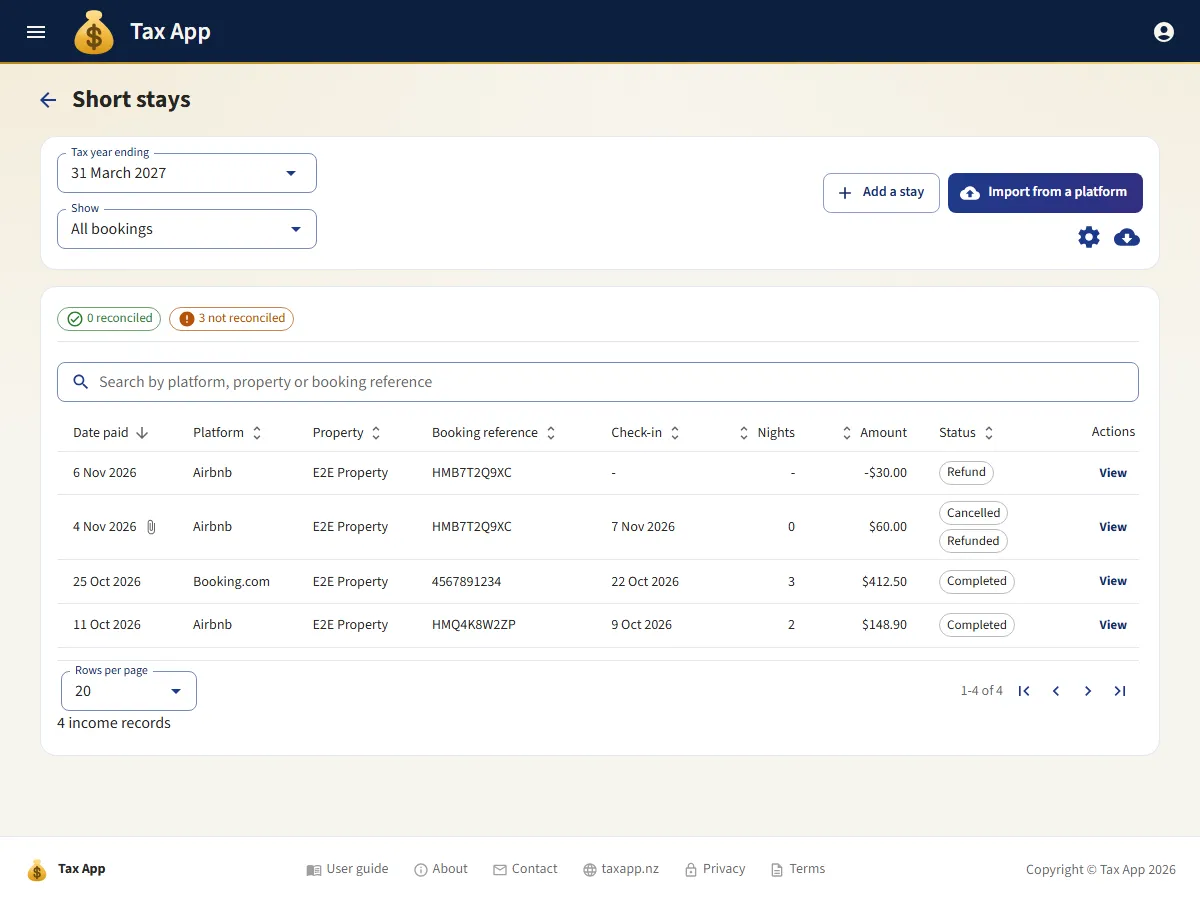
The list shows where each booking is up to. It is Upcoming before the guest arrives, In progress while they stay, and Completed once they have checked out. Cancelled and refunded bookings say so.
Each booking
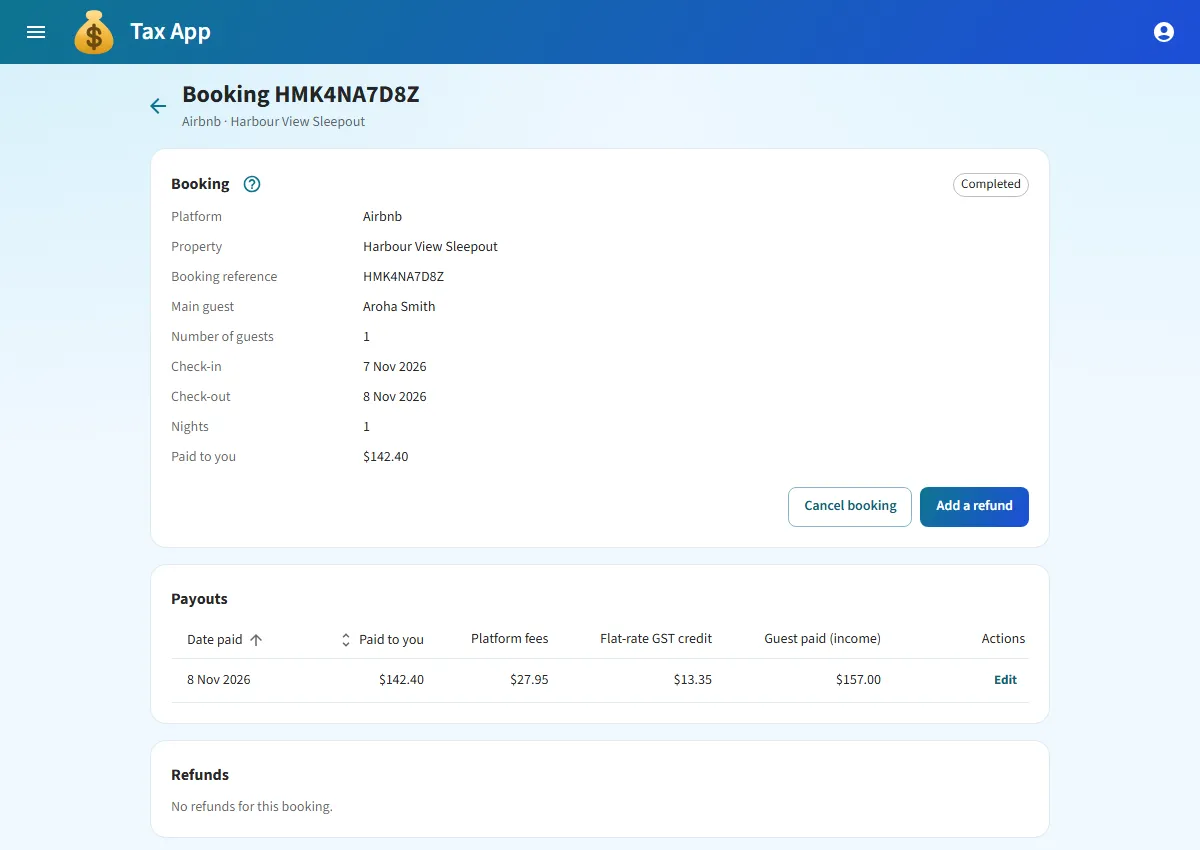
Open a booking to see everything about it in one place: its dates and guests, each payout the platform made for it, and any refunds. A deposit and the balance paid later show as two payouts of the same booking. You can keep files with a booking too, such as the confirmation or the platform's statement.
When a guest cancels
Press Cancel booking. The nights no longer count, so your occupancy and nightly-rate figures stay true. If the platform still paid you something, such as a cancellation fee, you earned that money, so it stays recorded as income. If the guest comes after all, press Reinstate booking.
When you give money back
Press Add a refund, for example when a guest left early or something went wrong with the stay. Say whether the platform took the refund off a later payout or you paid it back from your own bank. The refund comes off the income of that stay.
When a booking was entered by mistake
Delete booking is there for a booking that has not started and was never cancelled or refunded. Once a stay has started, been cancelled or been refunded, it stays on your records so your accountant can see what happened. You can still edit it to fix a mistake.
If you are registered for GST
On each property, choose who is registered for GST for its stays: no one, the owner, a partnership, or each co-owner on their own share. Do this before you add stays to the property. Tax App reminds you if you have not. The GST number, and the date the registration started, go on that person's or partnership's contact.
Once you are registered, the two kinds of booking are treated differently:
- Through Airbnb. Airbnb charges the guest GST and pays it to Inland Revenue, so you have no GST to pay on the stay, and Airbnb no longer adds the flat-rate credit.
- Booked with you directly. What the guest paid includes GST, and you pay that GST to Inland Revenue. Tax App works out the GST in each stay and shows it, and your income is what the guest paid less that GST.
If the people registered for a property change, you choose the day the change takes effect. Stays paid before that day keep the GST they had. Tax App shows the GST on every booking and in your reports, and sends it to Xero. It does not prepare your GST return.
Your bank and your reports
Platform payouts are matched against your bank statement like any other income, including a single payout that covers several stays. A refund you paid back from your own bank is matched in its own Short-stay refunds reconciliation.
The Short stays summary report shows, for each property, the bookings, nights booked and stayed, occupancy, the average nightly rate, and your income by platform and by month. It can be emailed to you on a schedule. The dashboard compares this year's short-stay income and nights with the same point last year. The tax summary shows short-stay income in its own section, apart from the rent: what guests paid, the GST in it, and each owner's share. It is taxed as rental income, on top of the rent.
Xero and AI apps
With Xero connected, each payout becomes a sales invoice to its platform, with the guest's payment, the platform fee and the flat-rate credit each sent to the account you choose. Each refund becomes a credit note. An AI app you connect can look up, add and change stays and refunds, but never delete them.
Tax App records what happened. Questions such as how much of a shared home's costs you can claim are for your accountant, and the report gives them the nights and figures to answer them.
Where to go next
- Reconciliation: matching platform payouts to your bank.
- Income tax: how rental income, short stays included, is taxed with your other income.
- Xero: how records arrive in Xero.
- AI apps: connecting an AI app to Tax App.