Tax App records your commission income, rental income and expenses through the New Zealand
tax year, and calculates the income tax, GST and ACC levies due on them. It is designed for
contractors, landlords and households.
Income, expenses, bank reconciliation, reports and a savings plan, organised by tax
year.
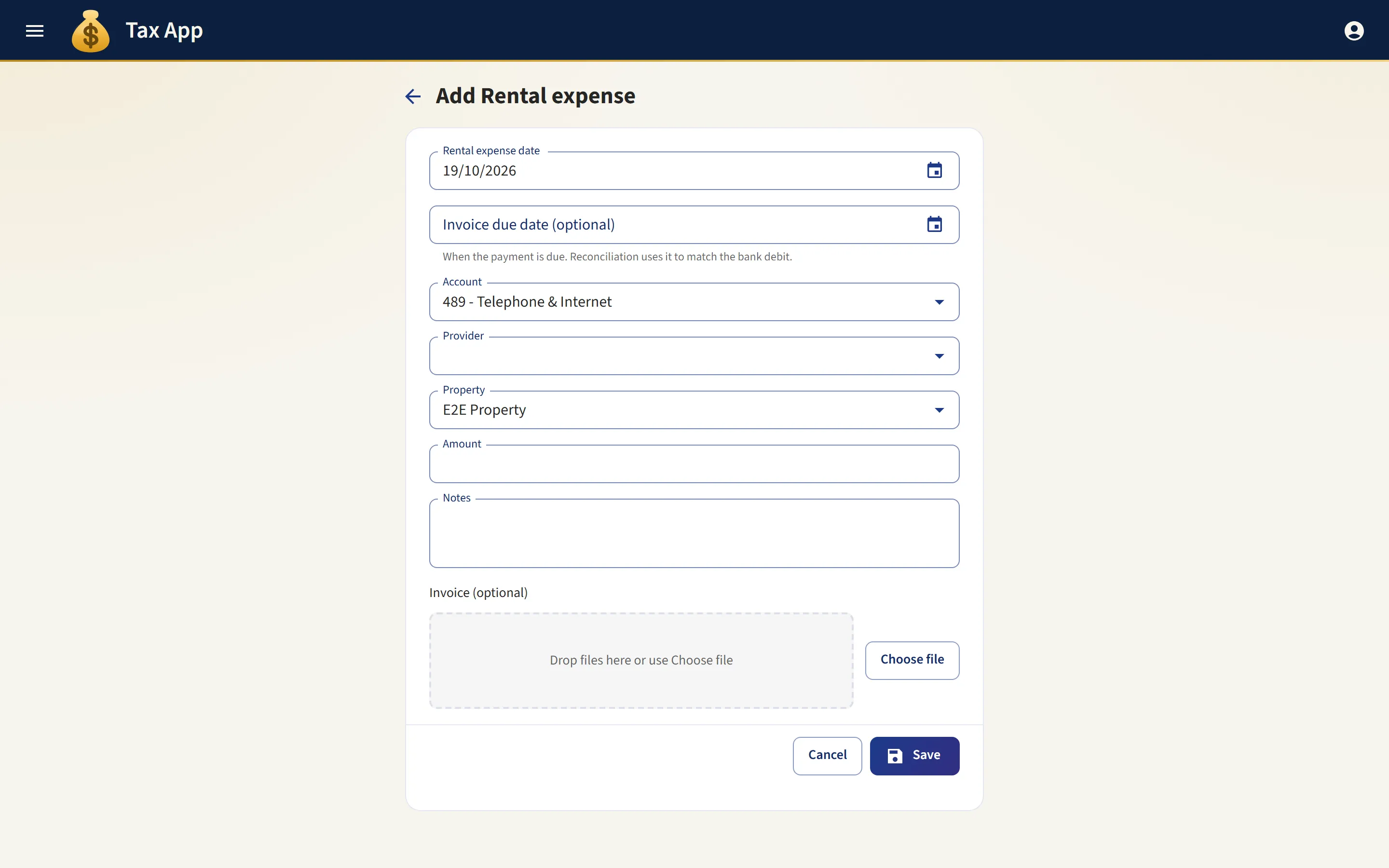
Expenses entered from the invoice
Attach an invoice and AI extraction fills in the date, amount and provider for you to check. Each expense is filed under an expense account, linked to a provider contact and, where relevant, to a rental property or commission stream. The invoice stays attached to the record.
Date, amount and provider read from the uploaded invoice
Expense accounts and provider contacts for each rental property or commission stream
Invoices stored with the expense record
app.taxapp.nz
Bank feeds and statement reconciliation
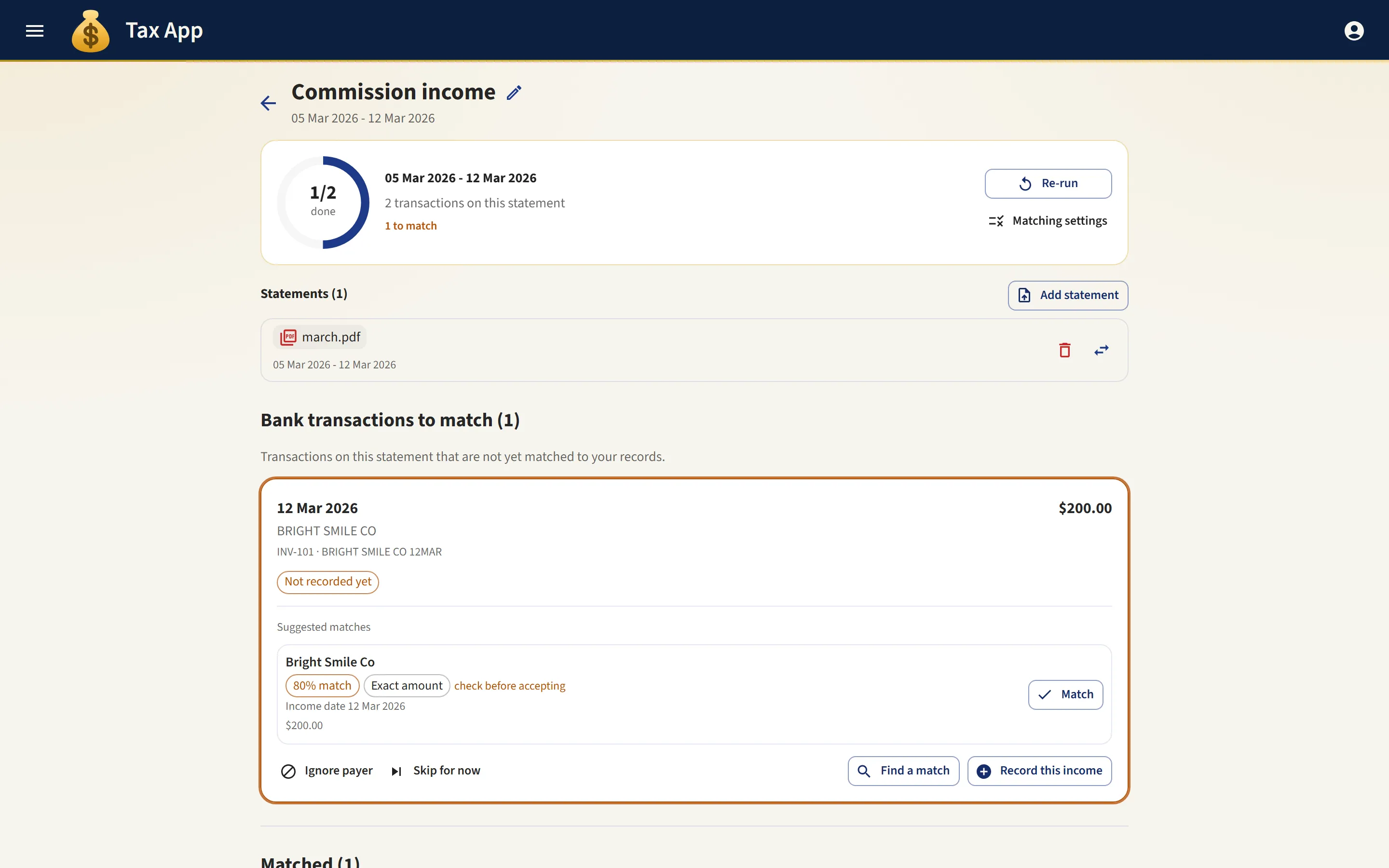
Connect your bank through Akahu and import its transactions, or upload the CSV statement your bank provides. Each transaction is matched against your income and expense records, regular payers are remembered, and unmatched transactions are listed so you can see what has not been recorded.
A bank feed import brings in every new transaction for the tax year. Importing again leaves matched work untouched
Transactions matched against income and expense records, with regular payers remembered
Matching works the same whether transactions come from a bank feed or a CSV file
app.taxapp.nz
A bank inbox that drafts your records
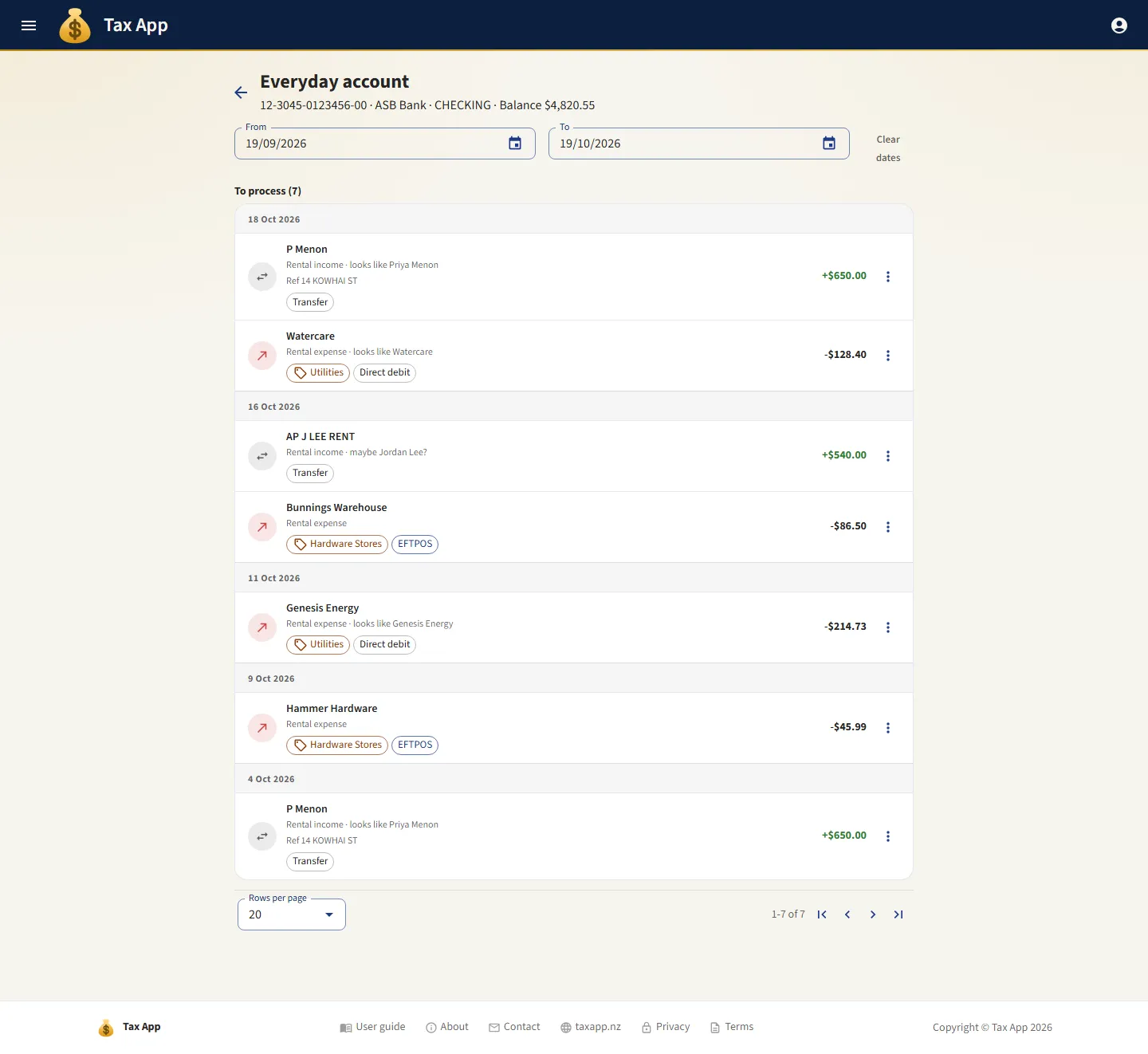
Transactions without a record are listed by account and grouped by day, as on a bank statement. Each shows the record it would become and the contact it appears to belong to, and Add opens a form already filled in. Transactions that are not business can be ignored and set aside.
Each connected account shows how many transactions are waiting to be recorded
Each transaction is matched to a likely contact and the appropriate income or expense type
Each line shows the business paid, the kind of purchase and the payment method
Add opens a prefilled record. Ignore sets aside transactions that are not business
app.taxapp.nz
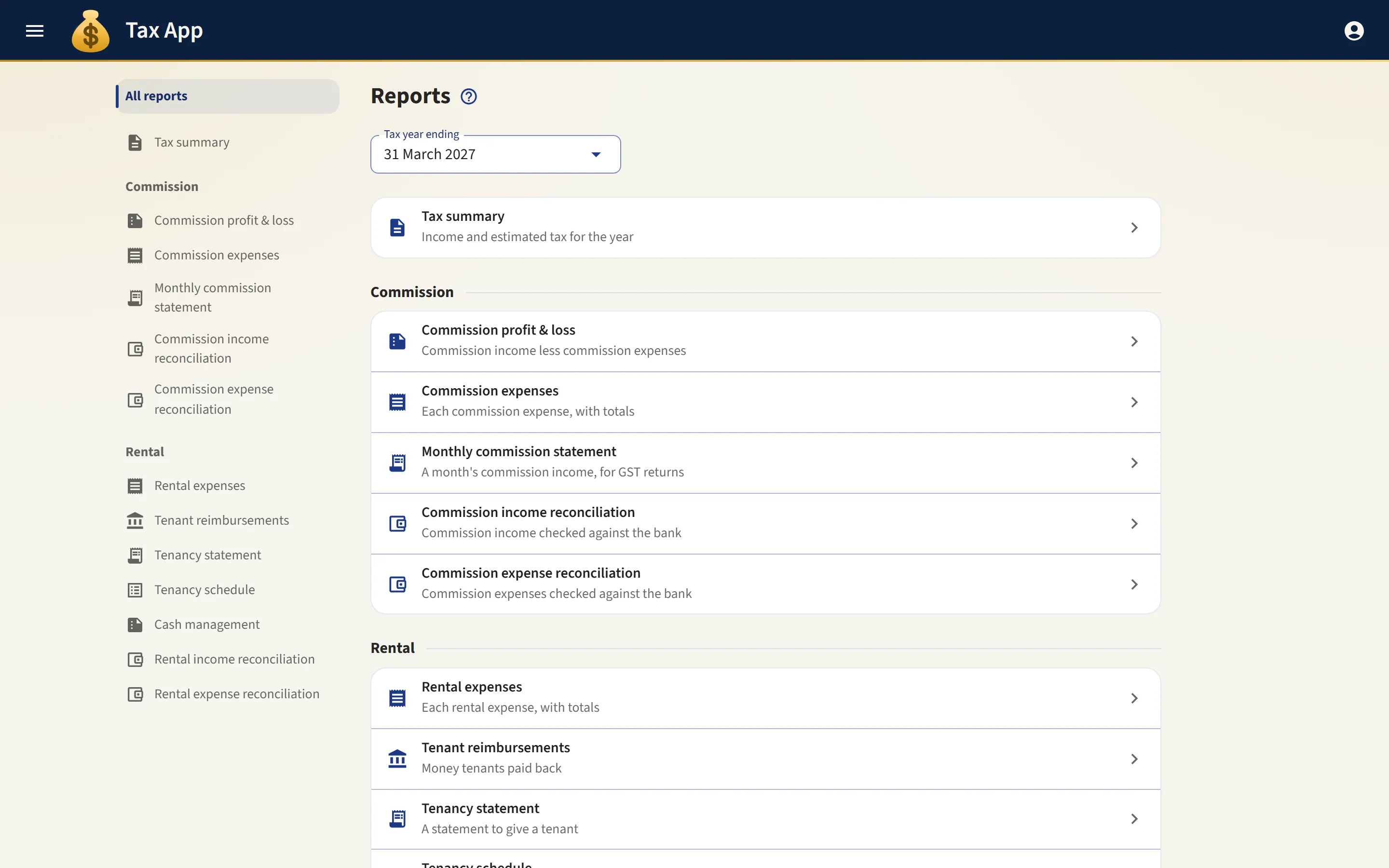
PDF reports for your accountant
Each report is a PDF built from the same figures shown on screen, itemising the tax, credits and levies behind every total.
Annual tax summary itemising income tax, GST, ACC and any tax credits
Rental profit and loss apportioned by each owner's share
Commission profit and loss, monthly statements and bank reconciliation reports
app.taxapp.nz
Scheduled reports
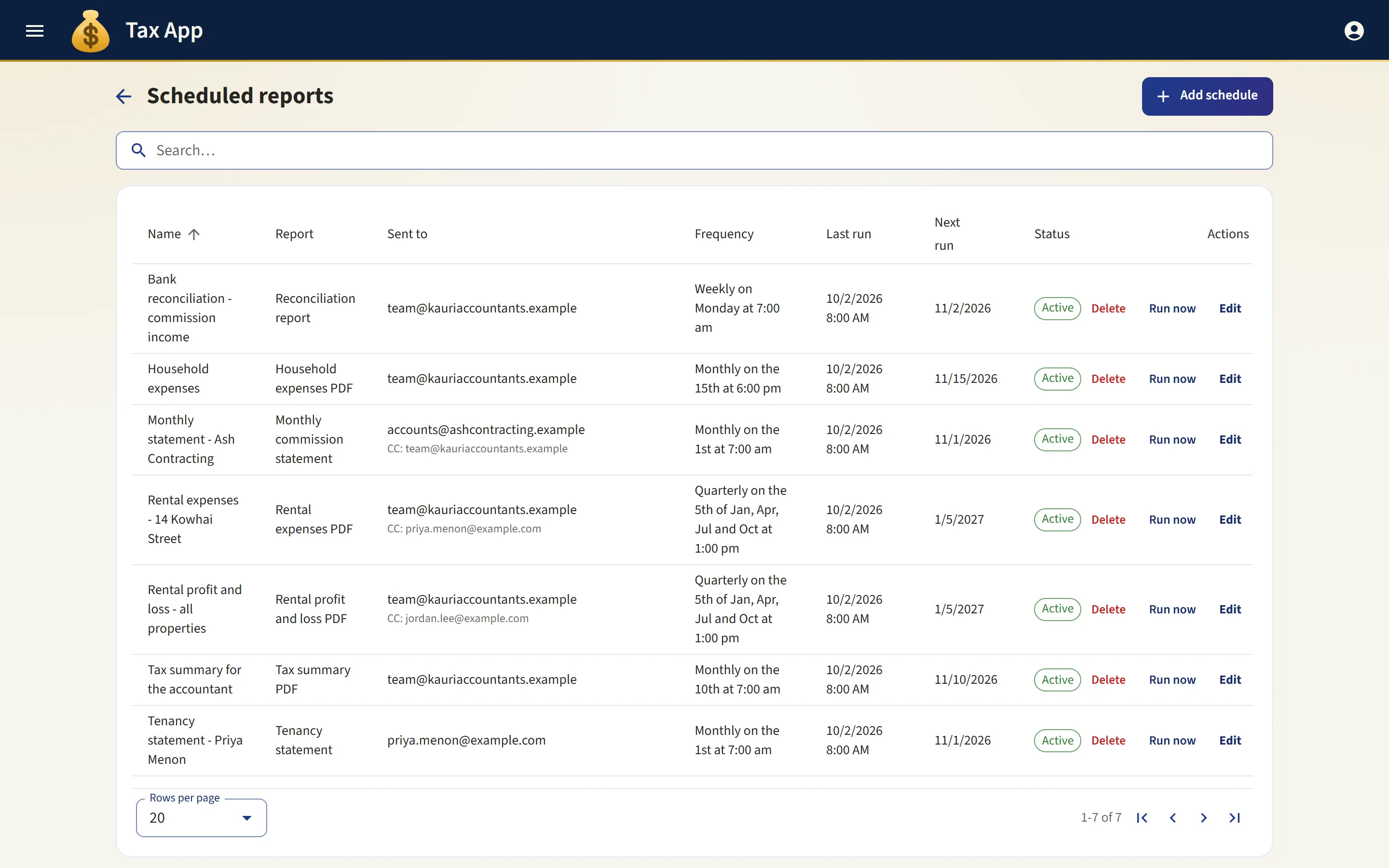
Any report can be scheduled to run and be emailed automatically: a monthly statement to a contractor, for example, or a quarterly tax summary to your accountant. You choose the report, its recipients and its frequency.
Daily, weekly, monthly, quarterly, or once on a chosen date
Addressed to one contact and copied to as many others as you like
Each run states the period it covers: the previous month, or the tax year to date
The list shows when each schedule next runs, and states clearly if a send has failed
app.taxapp.nz
A savings plan for your tax bill
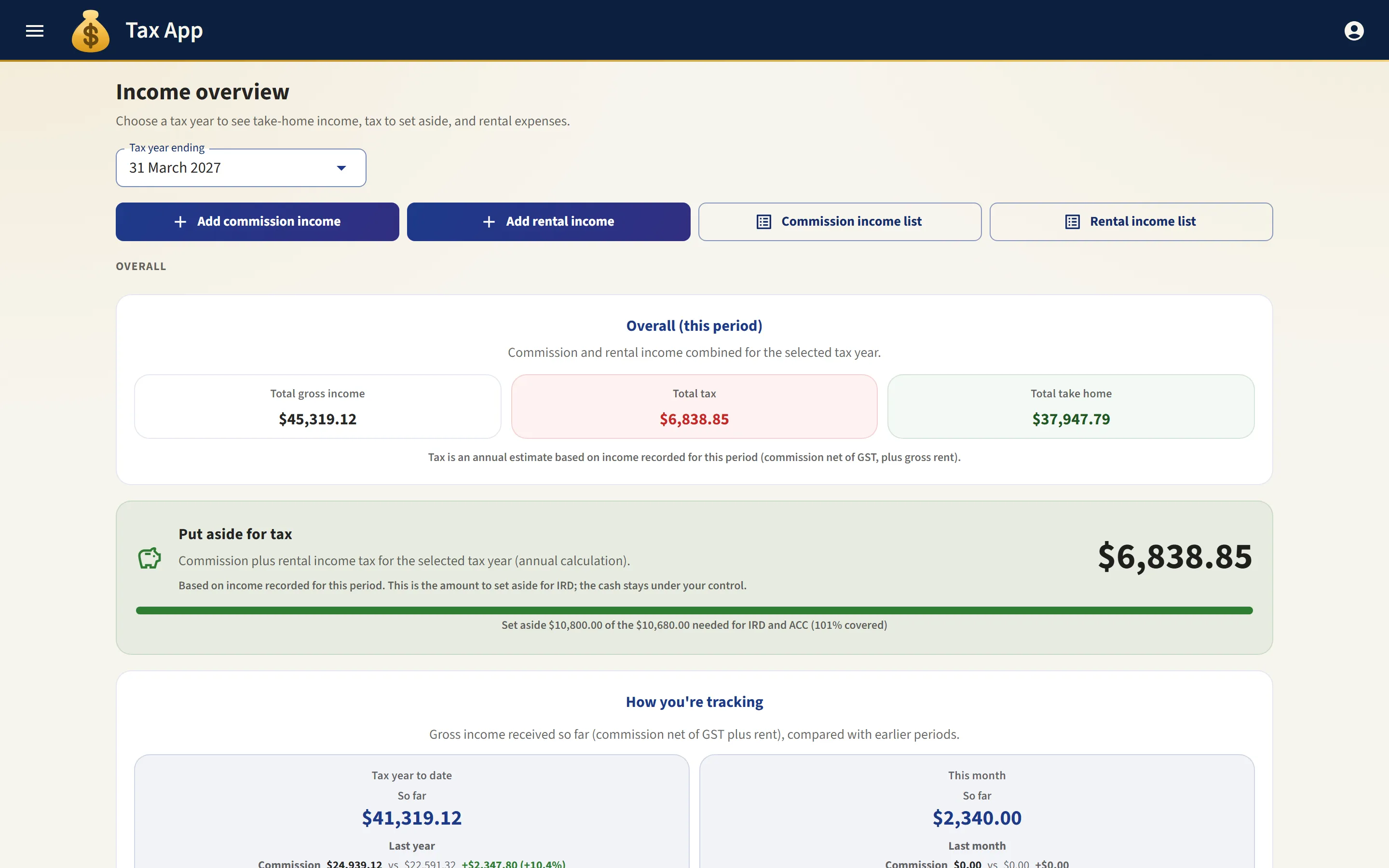
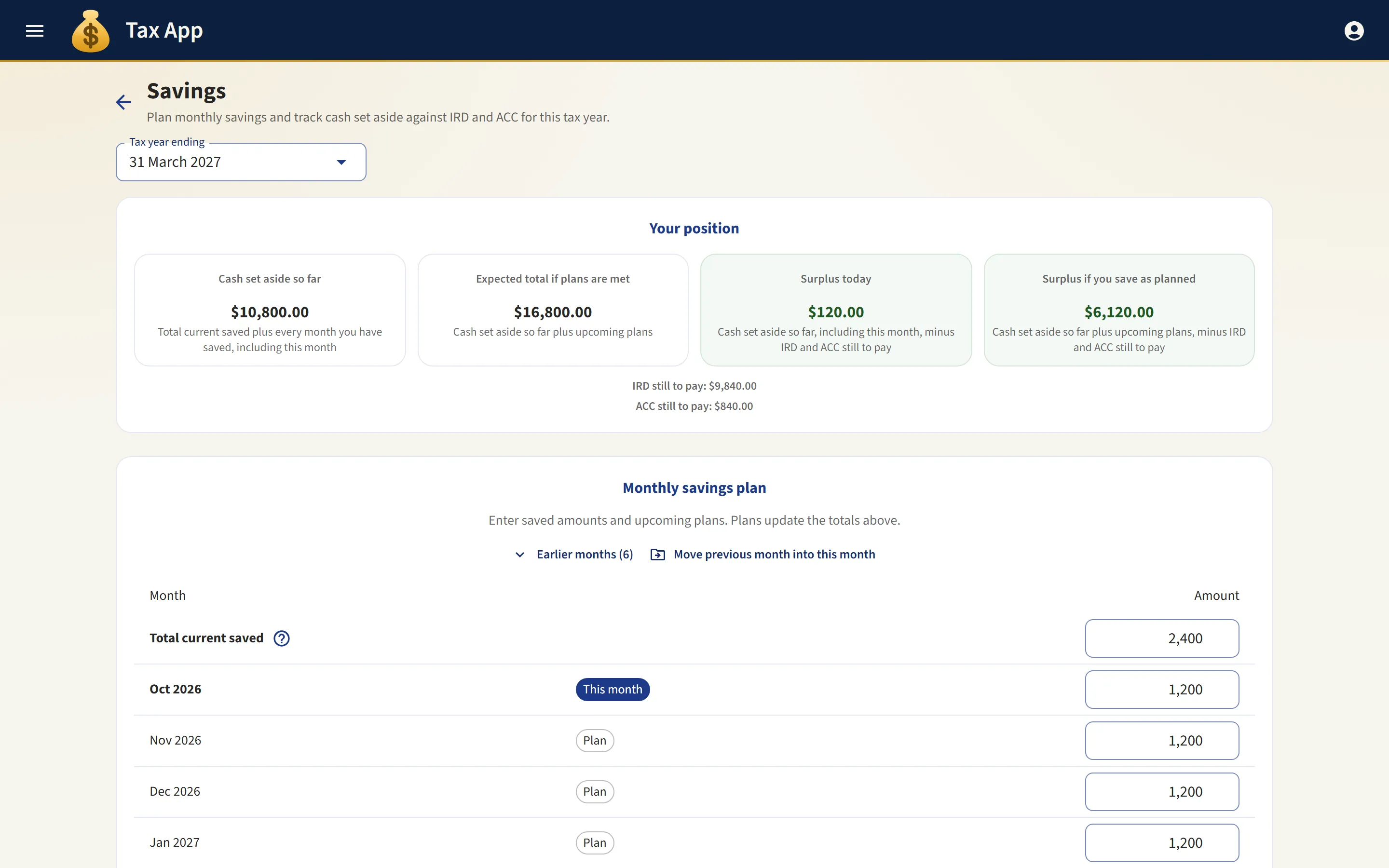
Tax App calculates how much to set aside for income tax and ACC from the income you record. A monthly plan shows whether your savings are on course to cover the bill.
A monthly plan comparing planned and actual savings
IRD and ACC payments recorded as they fall due
Current and projected surplus shown side by side
app.taxapp.nz
Bank feeds
Connect your bank through Akahu to bring transactions into reconciliation and into a bank inbox of suggested records. The connection is read-only and revocable, and Tax App never sees your internet banking login.
Income tracking
Commission, rental and tenant reimbursement income. Records can be added, copied, imported and exported as CSV, and filtered by contractor or property.
Dashboard
An overview of the tax year: total income, tax to set aside, this month's GST, and a comparison with the same day last year.
Reports
PDF tax summary, rental profit and loss by owner's share, commission profit and loss, and monthly statements for your accountant.
Scheduled reports
Any report can be emailed on a schedule to one contact and copied to others, so monthly statements and quarterly tax summaries are sent without anyone having to remember.
Savings plan
A plan for what to set aside for tax, with IRD and ACC payments recorded as they fall due.
Xero
Connect your own Xero organisation and choose, separately for income and for expenses, whether records are sent to Xero. Records travel in that direction only, so nothing is brought back to conflict with entries your accountant has made. Income arrives already marked as paid, because you record only money you have received.
AI connectors
Connect Claude, ChatGPT, Grok, VS Code or Cursor and ask about your records in ordinary language, such as this year's estimated tax. An owner switches the feature on and decides whether it may add and change records. Each person then connects their own AI app. It never deletes anything, and Tax App still calculates every figure.
Rentals and tenancies
Properties with their co-owners and ownership percentages, together with tenancy agreements, bonds and documents.
Reminders and statements
Email rent reminders and tenancy statements to tenants and other contacts from branded templates, attach files, and read replies in a single thread on the contact.
Contacts
A shared address book of tenants, suppliers, principal contractors and your accountant, each with an IRD number and attached documents.
Teams and organisations
Invite your partner or accountant by email as an owner, member or read-only member. You can belong to more than one organisation.
Guided setup
After you sign up, a setup wizard prepares your organisation, and an interactive walkthrough introduces each person to the parts of the app they use.
Sign-in options
Sign in with Google, or with an email address and password. Passwords are encrypted in your browser before transmission and stored only as salted hashes.
Works with Xero
Connect your own Xero organisation and keep it in step with Tax App. You approve the
connection in Xero. Tax App never sees your Xero password, and you can disconnect at any
time.
Income arrives already paid
Each income record becomes a Xero sales invoice with its payment already recorded, dated the day the money was received. Because Tax App records only money you have received, no income appears in Xero as an outstanding debt.
Expenses arrive as bills, with their due dates
Each expense becomes a bill carrying the due date from its invoice, so the amounts Xero shows as owing are the amounts you owe. A bill is marked as paid when you reconcile it, which is when the money is known to have left your account.
Reconciling marks the bill as paid
When you reconcile a bill in Tax App, it is marked as paid in Xero shortly afterwards, with no further action from you. This runs in the background, so a slow or unavailable Xero does not delay your reconciliation.
The two charts of accounts agree from the start
Your expense accounts start as Xero's own, with the same codes: Advertising is 400 in both, and Repairs and Maintenance is 473 in both. Rates, Water and Property Management are also added, because landlords need them. Little or no account mapping is needed before you begin.
Rent and commission stay apart
Each kind of income is settled against its own Xero bank account, and each kind of expense likewise, because rent and commission are often banked separately. Every record also carries a reference naming its line of business, so one Xero organisation can report on each separately.
Records travel one way, to Xero
Income and expenses are recorded in Tax App and sent to Xero. They are never brought back, so nothing conflicts with entries your accountant has made. Contacts and accounts each have their own setting: do not sync, send, bring in, or both ways. Nothing is deleted or overwritten on either side, and no record is sent twice, however often you sync.
Contacts kept in step
Contacts are matched by name and created on whichever side lacks them. A supplier added in Tax App appears in Xero, and a contact kept in Xero can be brought into Tax App, so the two lists stay consistent.
Failures are reported
When a record cannot be sent, it is named with the reason: it has no contact, it has no account, or Xero rejected it.
Xero is optional and stays off until you switch it on. It is one of the modules you choose
when you set up your account, and it can be switched on or off later without affecting your
records. The Xero guide describes what reaches your accountant's
records and what the connection does not do.
Guides
Detailed explanations of the features people ask about most, including what each one
does not do.
Tax App is designed for commission income, rental income and household expenses.
Commission earners and contractors
For people whose income arrives unevenly through the year.
The tax to set aside, shown as you earn
Comparisons with the same day of the previous tax year
Commission profit and loss and statements for each contractor
Landlords and co-owners
For rental properties owned by couples, families or groups.
Co-owners recorded with their actual ownership percentages
Rental profit and loss apportioned by each owner's share
Tenancy agreements, bonds and documents attached to the property
Households
For keeping a full tax year of income and expenses in one place.
Income, expenses and documents organised by tax year
Bank reconciliation that shows what has not been recorded
A single PDF summary at year end to support filing
How it works
1. Create an account and choose your income sources
Commission, rental income, or both. Setup takes a few minutes, and you can invite your partner or accountant to the same organisation.
2. Record income and expenses
Connect a bank feed or upload CSV statements, attach invoices, or enter records directly. Statement matching and AI invoice extraction fill in much of the detail for you to check.
3. Follow your tax position through the year
Each record updates the estimated tax for the year. At year end, download the PDF summary to support your return.
Accuracy and data handling
How the figures are calculated, and where your data is kept.
How the numbers are calculated
Income tax is calculated from the Inland Revenue (IRD) marginal brackets for each tax year
Past tax years use the rates that applied at the time
Tax credits, GST, ACC and KiwiSaver are worked out on each record
Income tax can be checked against the IRD calculator, and the ACC levy against your ACC invoice
How your data is handled
Stored in New Zealand on AWS infrastructure in Auckland, encrypted in transit and at rest, and backed up daily
Passwords are encrypted in your browser before transmission and stored only as salted hashes. You can sign in with Google instead
Bank feeds are read-only and run through Akahu. Tax App never receives your internet banking login
Organisation roles control access, and read-only members cannot change records
Records export as CSV or PDF, and you can delete your account and its data at any time
The security page explains how encryption, documents, bank feeds and
access control work.
Pricing
Tax App is free while in early access.
Early access
Free
Every feature is included while Tax App is in early access. No card is required.
Commission, rental and reimbursement income tracking
Expenses, with AI extraction from invoices
Bank statement reconciliation
Rental properties, tenancies and co-owner splits
PDF reports and CSV exports for filing
Savings plan with IRD and ACC payment tracking
Team members, and read-only access for your accountant
If paid plans are introduced, existing users will be told well in advance.
Frequently asked questions
Is Tax App free?
Yes. Every feature is free during early access, and no card is required. If paid plans are introduced, existing users will be told well in advance, and nothing will be charged without their explicit agreement.
What happens to an unused organisation?
An organisation is unused when nobody signs in to it or uses it through a connected AI app. Because Tax App is free, we may disable an unused organisation, and may delete one that nobody has signed in to for more than 3 months. Before deleting it, we make a full copy of its records and files and email its owners a link to that copy, which works for 90 days. The terms of use set out the details.
How are the tax figures calculated?
Income tax is calculated from the Inland Revenue (IRD) brackets and credits in force for each tax year, so past years use the rates that applied at the time. Because IRD taxes your total income, the app stacks your income in a fixed order: PAYE salary first (already taxed by your employer), then commission, then rental income. It then shows the additional tax each source adds. Any figure can be checked against the IRD calculator. Confirm final figures with IRD or your accountant before filing.
Where is my data stored?
Your records are stored on AWS infrastructure in Auckland, New Zealand, and the daily backups are held in New Zealand as well. The default rule of Inland Revenue (IRD) is that business records are kept in New Zealand. The rules also permit offshore storage with IRD approval or through an IRD-approved provider, and offshore backups where the primary records remain in New Zealand. We keep both records and backups in New Zealand by choice. The app's server, passwords and keys are also in New Zealand. Data is encrypted in transit and at rest. Passwords are encrypted in your browser before transmission and stored only as salted hashes, and you may sign in with Google instead. Email is sent from Sydney (with a US-based backup service), and the app's own files are served from Sydney; neither stores your records, apart from email replies, which are held for up to 30 days. If your organisation turns on address lookup with its own Addressfinder account, lookups go to Addressfinder, a New Zealand company, which keeps what you type and the address you choose in its logs in Australia for up to 14 days. The address you save, with where it is on the map, stays with your records in Auckland. The small map under an address is drawn from OpenStreetMap, based in the United Kingdom, which sees your IP address and the area of the map shown, but not the address itself. If you choose View on OpenStreetMap, it also receives the exact spot on the map.
Which other companies handle my data?
A few, each only for its own job. AWS runs the app and keeps your records in Auckland. Amazon SES sends email, with Resend as a backup. ipwho.is turns an IP address into a rough location. Google reCAPTCHA guards the contact form on this website. Google Fonts supplies the typeface the app uses. Everything else is used only when you turn it on: Sign in with Google, Akahu for bank feeds, Xero, Tenancy Services, Addressfinder for address lookup, OpenStreetMap for the map under an address, the AI provider your organisation chooses, and any AI app you connect. The service providers page lists each one, with when it is used and what it receives. We do not sell your information or share it with advertisers.
Yes, in three ways. You can invite your accountant to your organisation as a read-only member. You can send them the PDF tax summary and rental profit and loss reports at year end. Or you can schedule a report to be emailed to them monthly, quarterly, or at whatever interval suits you both.
Can reports be emailed automatically?
Yes. Any report can run on a schedule (daily, weekly, monthly, quarterly, or once on a chosen date) and be emailed as a PDF. Each schedule is addressed to one of your contacts and can be copied to as many others as you like, so your accountant and a co-owner can receive the same statement. Each schedule shows when it next runs, and states clearly if a send has failed.
Does it handle GST, ACC and KiwiSaver?
Yes. GST and ACC levies are worked out on each commission income record, and so is KiwiSaver for contractors who contribute. The annual tax summary itemises each of them.
Can I import my bank statements?
Yes, in two ways: connect a bank feed through Akahu and import transactions directly, or upload CSV statements exported from your bank. Either way, the reconciliation screen matches each transaction against your records, remembers your regular payers, and lists any transactions that have not yet been recorded.
Is a bank feed safe?
The connection runs through Akahu, a New Zealand open banking provider. Tax App never asks for, or sees, your internet banking login. The app holds only access tokens that can read transactions. They cannot move money. The tokens are stored encrypted and never displayed again, and you can revoke them at Akahu or disconnect in the app at any time. The security page explains how all data is protected.
What does connecting Xero do?
Your income records become sales invoices in Xero and your expenses become bills, each carrying its date, amount, contact and account. Income arrives already marked as paid, because Tax App records only money you have received. Expenses arrive as bills with their invoice due date and are marked as paid when you reconcile them, which is when the money is known to have left your account. Nothing is deleted or overwritten on either side, and no record is sent twice, however often you sync. The Xero guide explains the arrangement in full, including what the connection does not do.
Do I have to match my expense accounts to Xero by hand?
Rarely. Every organisation starts with the same chart of expense accounts that Xero starts with, using the same codes: Advertising is 400 in both, and Repairs and Maintenance is 473 in both. Three accounts that Xero does not provide are also added, because landlords need them: Rates, Water and Property Management. The two charts therefore agree from the outset. You can change any account, and each one shows its code beside its name.
Will Xero treat my rental and my other work as one business?
No. Every record sent to Xero carries a reference naming its line of business, so a single Xero organisation that holds both a rental and a practice can still report on each separately. Bank accounts are also set for each kind of income and expense, so rent is settled against the account it is banked into, and commission against its own.
Does Tax App replace Xero?
No. Xero is a full accounting suite with invoicing, payroll and GST returns, and it is where most accountants work. Tax App is a simpler tracker for commission income, rentals and household expenses that estimates your tax position through the year. If you connect the two, you keep your records once, in Tax App, and they are sent to Xero, where your accountant expects to find them. You file in myIR or through your accountant.
Is my Xero password shared with Tax App?
No. You approve the connection at Xero, which asks which of your organisations to share and issues a key that gives access to that organisation alone. Tax App never sees your Xero login. You can withdraw permission in Xero at any time, or disconnect in the app. Nothing is removed from either set of records when you do.
Can I export my data?
Yes. Income and expense lists export to CSV, and every report downloads as a PDF. You can also export your organisation's complete data as a single archive, and you can delete your account and its data at any time.
How is Tax App different from Xero, MYOB or Hnry?
Xero and MYOB are full accounting suites for businesses, with invoicing, payroll and GST returns. Hnry acts as a tax agent for sole traders and charges a percentage of income. Tax App is a simpler tracker for commission income, rentals and household expenses. It estimates your tax position through the year and organises the information you or your accountant need for filing. Tax App is not a tax agent and does not act on your behalf with Inland Revenue (IRD).
Try Tax App
Create a free account and begin recording this tax year's income and expenses.